Adaptive Mastering
€7.99 per master
Choose Balanced, Loud Electronic or Streaming. Download your finished master.
Direct payment or 1 mastering credit
Open Mastering →
No subscription anywhere on this site. Every calculator and Track Analyzer are free, with no account required. Paid processing (Mastering, Reference Mastering, EQ Studio export and Stem Splitter) charges once per use. Credits apply only to Adaptive Mastering. Producer studios are one-time unlocks; DJ Mode is a 30-day pass without automatic renewal.
Understand your track or your room before spending anything. These never require payment or an account.
Loudness, true peak, dynamics, stereo width, and frequency balance — measured, plain-English.
FreeCompare your track's measurements directly against a reference you upload.
FreeEvery axial, tangential, and oblique room mode up to 300 Hz.
FreeA starting-point monitor and listening position layout in under two minutes.
FreeSabine-equation reverberation estimate from your room's dimensions and surfaces.
Try the free analysis or preview first. Pay for the finished file when you are ready. Only Adaptive Mastering accepts mastering credits; the other tools use direct payment. Master Chain Studio, where you build and export your own master by hand, is free.
€7.99 per master
Choose Balanced, Loud Electronic or Streaming. Download your finished master.
Direct payment or 1 mastering credit
Open Mastering →€2.99 per master
Upload a reference and create a master with broad tonal matching and peak protection.
Direct payment · no mastering credits
Open Reference Mastering →€7.99 per separation
Separate vocals and instrumental, or vocals, drums, bass and other. Hear a free preview first.
Direct payment · no mastering credits
Open Stem Splitter →€1.99 per WAV export
Use the EQ and compare playback for free. Pay to download the processed WAV.
Direct payment · no mastering credits
Open EQ Studio →€4.99 per track
Your track is measured and an editable mastering chain is built from your choice of sound character and context, with the reason for every decision. Measuring is free; editing and exporting the chain afterwards is free too.
Direct payment · no mastering credits
Open Master Chain Studio · Pro Automate →Stem Splitter is in Preview while its infrastructure is validated at scale. See the FAQ below for processing times and failed jobs.
Explore each tool before upgrading. Paid access is linked to your account.
€29.00 one-time purchase
Generate and edit chords, bass and melody together; export separate MIDI tracks.
No subscription.
Explore MIDI Studio Pro →€14.99 one-time purchase
Generate grooves and variations, lock your favourite drums, and export MIDI, WAV loops and stems.
No subscription.
Explore Drum Studio Pro →€14.99 one-time purchase
Generate vocal patterns and three related variations from your recording; preview and export your groove.
No subscription.
Explore Vocal Studio Pro →€9.99 one-time purchase
Shape five instrument layers with advanced sound controls and regenerate individual parts.
No subscription.
Explore Disco Machine Pro →€9.95 30-day pass
Analyze up to 30 tracks together and explore a suggested set order with tempo, key and transition notes.
No automatic renewal.
Explore DJ Mode →Buying a pack is never required — you can always just pay €7.99 directly per master. A pack is a one-time purchase (not a subscription) that gives you a credit balance to spend later, at a modest per-credit discount for buying more at once.
3 credits · €7.19/credit · 10% off buying one at a time
3 mastering credits, one-time purchase.
Sign in to buy6 credits · €6.63/credit · 17% off buying one at a time
6 mastering credits, one-time purchase.
Sign in to buy12 credits · €5.99/credit · 25% off buying one at a time
12 mastering credits, one-time purchase.
Sign in to buyAlready signed in? Buy a pack directly from your account's Credits page.
Editable spreadsheets and guides you own — pay once, keep forever, not a locked PDF.
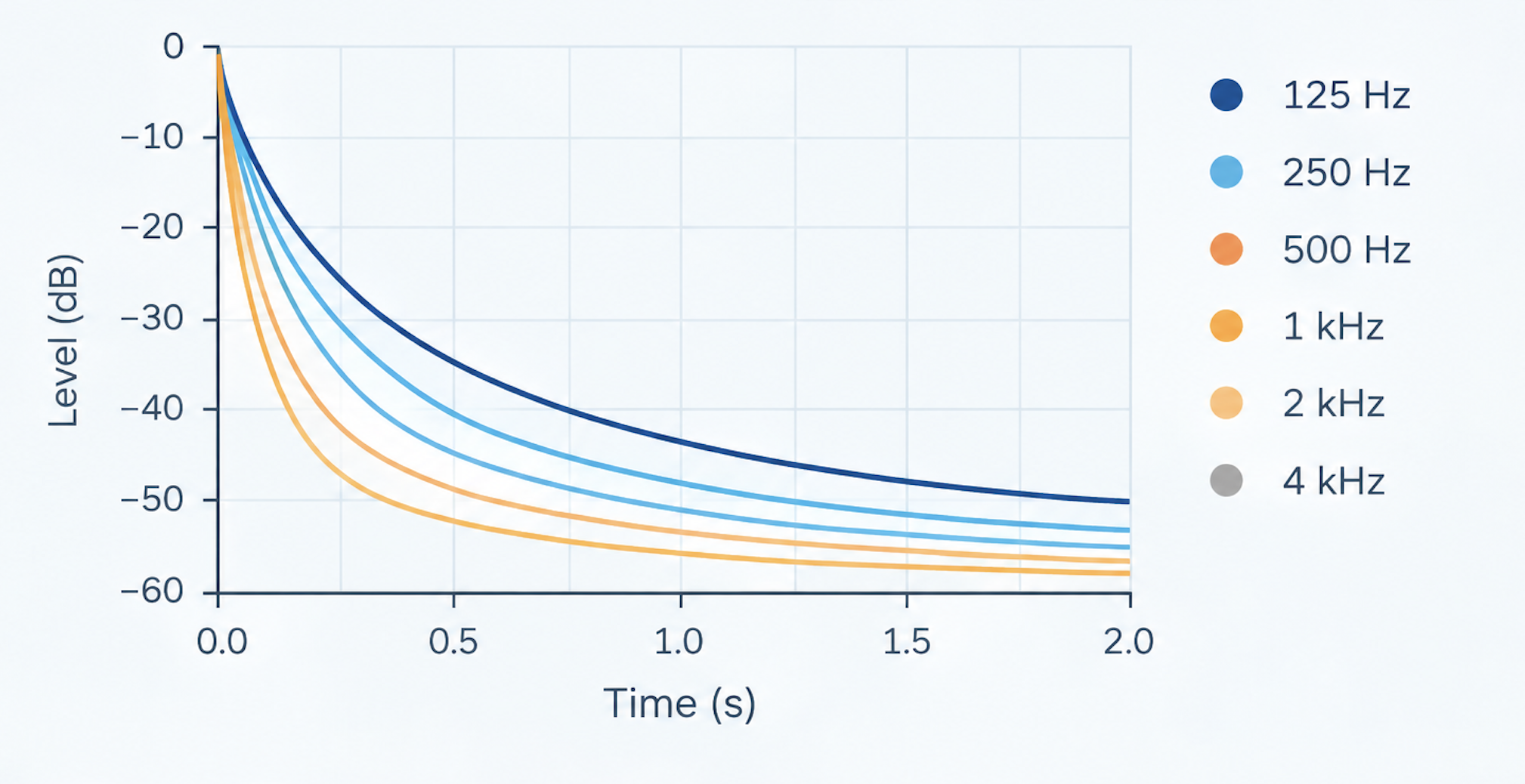
Reverberation time by octave band, current room versus proposed treatment, in a file you keep.
An editable Sabine-equation RT60 workbook: up to 20 surfaces with your own materials and coverage, a proposed-treatment scenario, reference target ranges by use, and current-versus-proposed RT60 by octave band with a chart. It uses the same Sabine calculation as the free RT60 Calculator on this site. What the workbook adds is an offline file you keep and edit, your own absorption coefficients, and a before/after scenario.
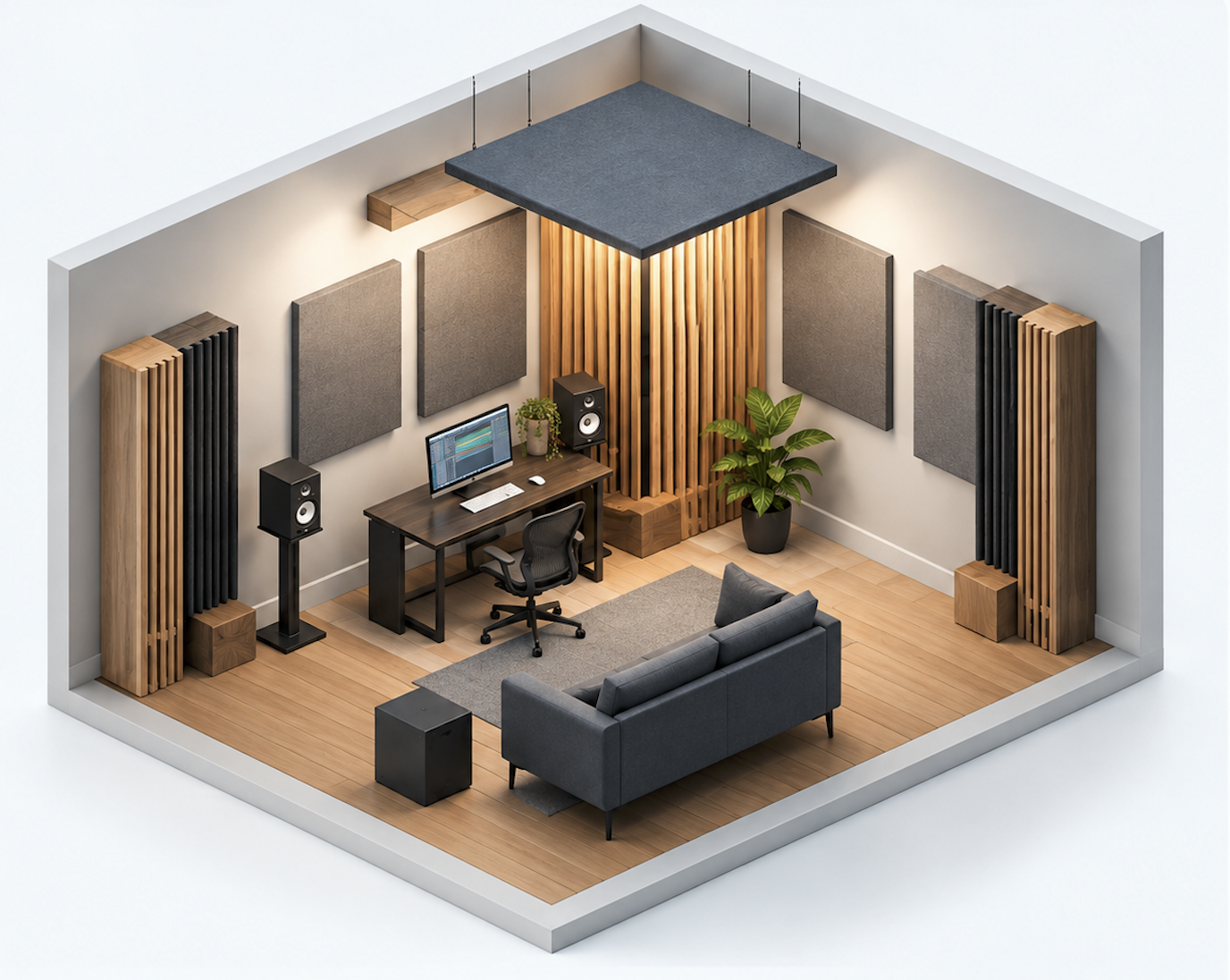
Turn your room's numbers into a starting-point shopping list.
Room size to a starting-point treatment plan: editable panel size and wall-coverage target, quantities by group (first-reflection panels, side-wall panels, rear-wall panels, corner bass traps, ceiling cloud) with where each goes, and a priority-ordered shopping list where you enter your own unit costs to get a total. No prices are built in.
A concise, illustrated introduction to planning your home studio acoustics.
A 7-page illustrated PDF covering room modes, reflections, reverberation, speaker placement and a practical treatment sequence. A compact starting guide, not a personalized room report or workbook.
One room, entered once: modes, speaker placement, RT60 and a treatment plan in a single editable workbook, with the guides to use it.
The flagship Studio Music Tools acoustic product. The Studio Project Workbook carries one room through room-mode analysis, a comparison of two speaker layouts, an RT60 estimate before and after treatment, and a treatment plan with your own costs, ending in a printable summary. Also included: the RT60 Workbook, the Acoustic Treatment Planner, the Home Studio Acoustic Guide, a Measurement Guide, a Studio Setup Checklist and a worked example. The free browser tools give quick answers; the Toolkit is the reusable planning file.
One-time purchases for the rest of your session, not just your room or your master. See the full catalog at /producer-tools.

For when the free tools and products aren't enough and you want Studio Music Tools to review your specific room directly. Full details and intake form on /consulting.
No. Nothing on this site is a subscription. Calculators and Track Analyzer are free with no account. Mastering and stem separation are billed per use, once, when you choose to process a track. Credit packs (below) are a one-time purchase too — buying one never enrolls you in anything recurring.
1 credit equals 1 standard profile mastering job — there's no confusing conversion rate to work out. Buy a pack once, spend credits whenever you master a track instead of paying €7.99 each time, and see your balance and full history any time on your account's Credits page. You can always pay directly instead. Reference mastering is a separate €2.99 direct payment and does not use credits.
If you paid with credits and the job fails on our end, the credit is refunded to your balance automatically — no request needed. If you paid directly via Mollie and a job fails on our end, contact us with your order number and we'll sort it out directly; direct payments aren't refunded automatically, so that path is handled by a real person rather than an unqualified “automatic refund” promise.
A paid order's download link works for a limited window after payment, shown on the order confirmation and your account's Downloads page — download your file within that window. Mastered files and separated stems both follow the same retention rules described in our Privacy policy.
Stem Splitter works and can be bought, but it runs on infrastructure we're still validating at scale, so it is labelled Preview rather than fully live. You always hear a short free preview before paying, longer tracks can take several minutes to process, and if a paid job fails on our end you can contact us with your order number.
WAV, MP3, AIFF, and FLAC are all accepted for upload. Analysis and mastering have different duration limits, shown on their upload pages. Current limits are shown on the upload pages; mastering eligibility is checked before payment.
More questions? See the full FAQ page.
Track Analyzer and the acoustics calculators are free — start there before paying for anything.